Presentation to the Ministry for Public Enterprises
Cabinet Link
Reporting from Samoa's state-owned enterprises to the Ministry and the Minister, every two weeks
False Cognitive Technologies · October 2026
False Cognitive Technologies · Cabinet Link · October 2026
2
Four questions the Ministry needs answered each period
Cabinet Link was built for American Samoa's Governor's Office to answer these questions about its departments. They apply equally to MPE and the SOEs.
We do not know the Ministry's current process in detail.
We ask MPE for a baseline: how many SOE reports are on time today.
We also ask how long the Minister's briefing takes to prepare.

How do separate SOE updates become one briefing?
Every SOE writes in the same seven sections, and the system merges them into one executive summary.

Which SOEs have reported, and which are late?
The send time of every report is recorded, so the on-time record builds up with no extra work.

Which items need the Minister's decision?
SOEs mark items for decision, and these appear first on the Minister's dashboard.

Is each SOE improving on its own measures?
SOEs report agreed metrics each period, and the system charts them over time.
False Cognitive Technologies · Cabinet Link · October 2026
3
Four roles: SOE coordinator, SOE CEO, reviewer and Minister
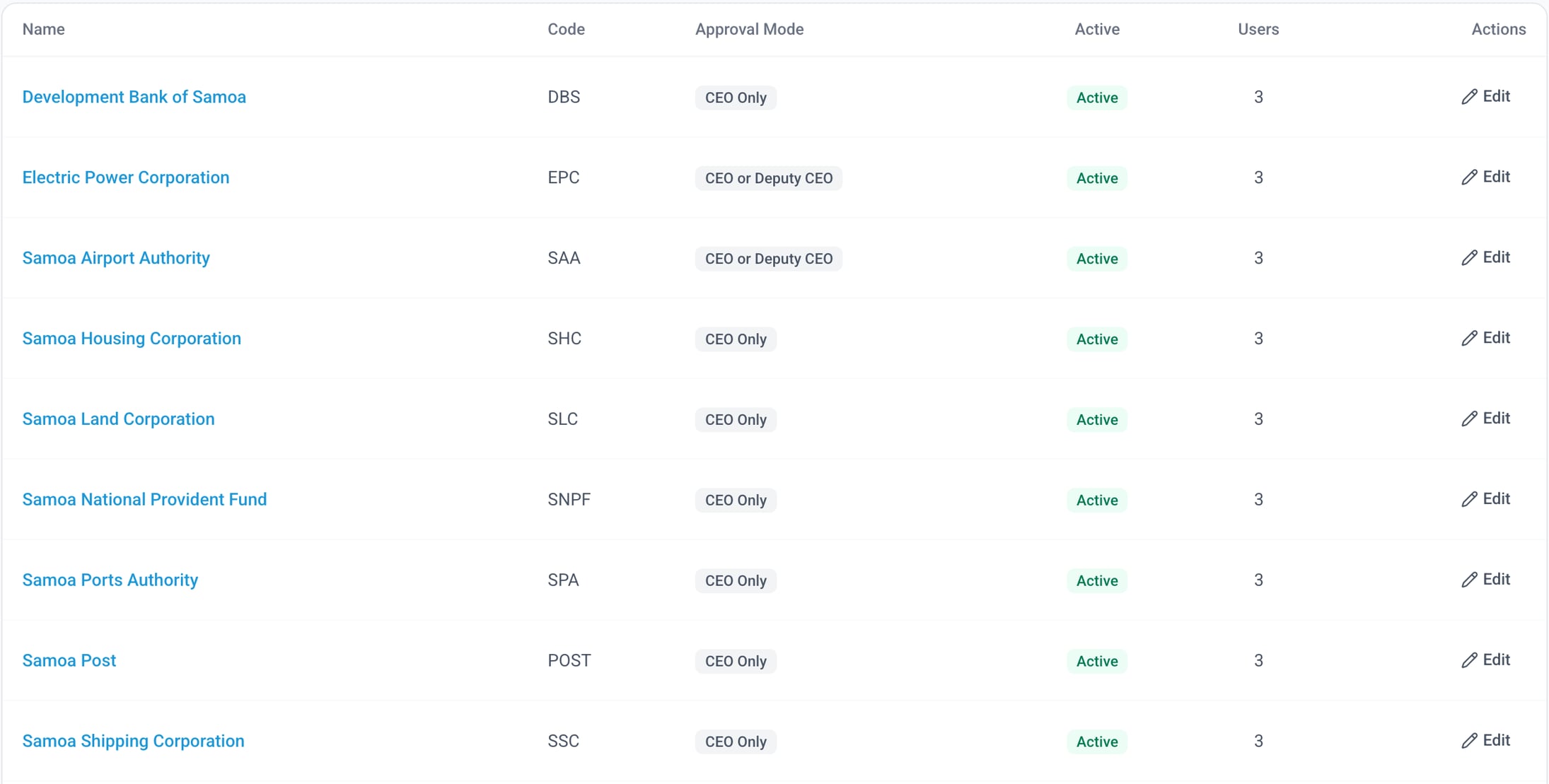
Enterprises page, administrator view
Nine of the 12 demo SOEs, each with a code and approval mode. SOE names are real; people, reports and figures are fictitious.

SOE coordinator
Drafts the report and its metrics each period, then passes it to the CEO.

SOE CEO and Deputy CEO
Approve and send the report to the Ministry. Each SOE chooses CEO only, or CEO or Deputy.

Ministry reviewer
Reviews each report, comments, flags items for the Minister and can return it for revision.

Minister
Reads the dashboard and the combined briefing, and can send questions to SOEs.

Other Ministry roles
The software also has MPE Chief Executive, Executive Assistant and Associate Minister roles. We set up only those you want.
False Cognitive Technologies · Cabinet Link · October 2026
6
SOEs write the report in fixed sections with metrics
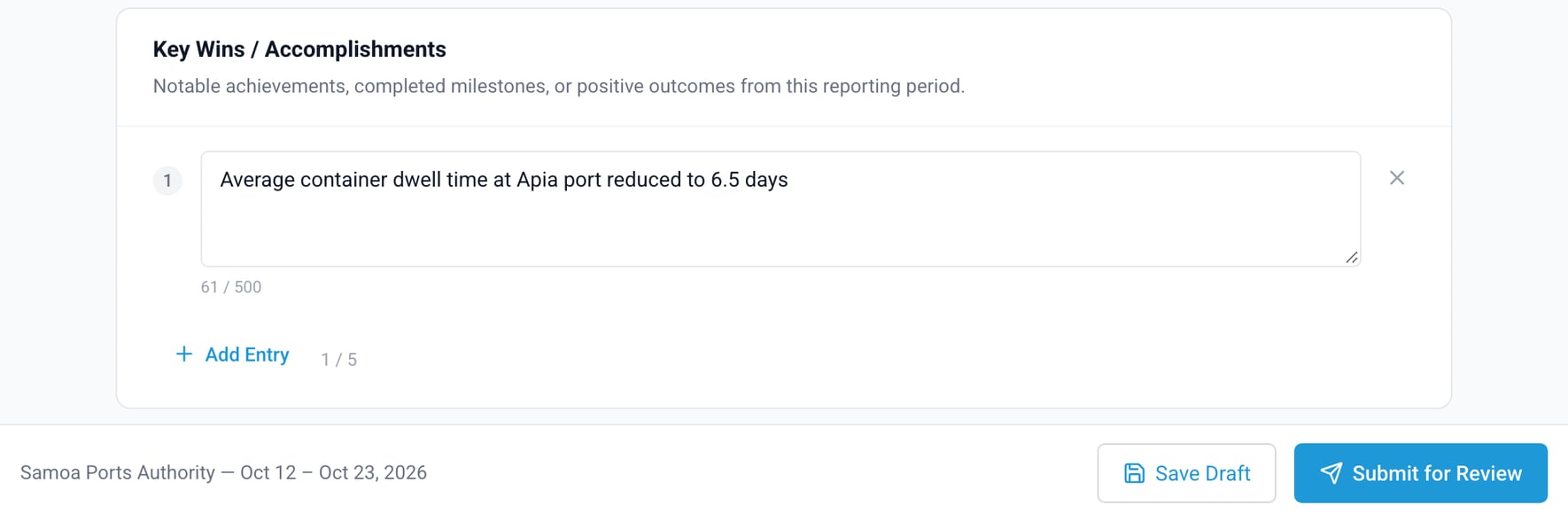
Writing the report
Seven fixed sections, each with up to five entries of up to 500 characters. New reports start as Ministry only.
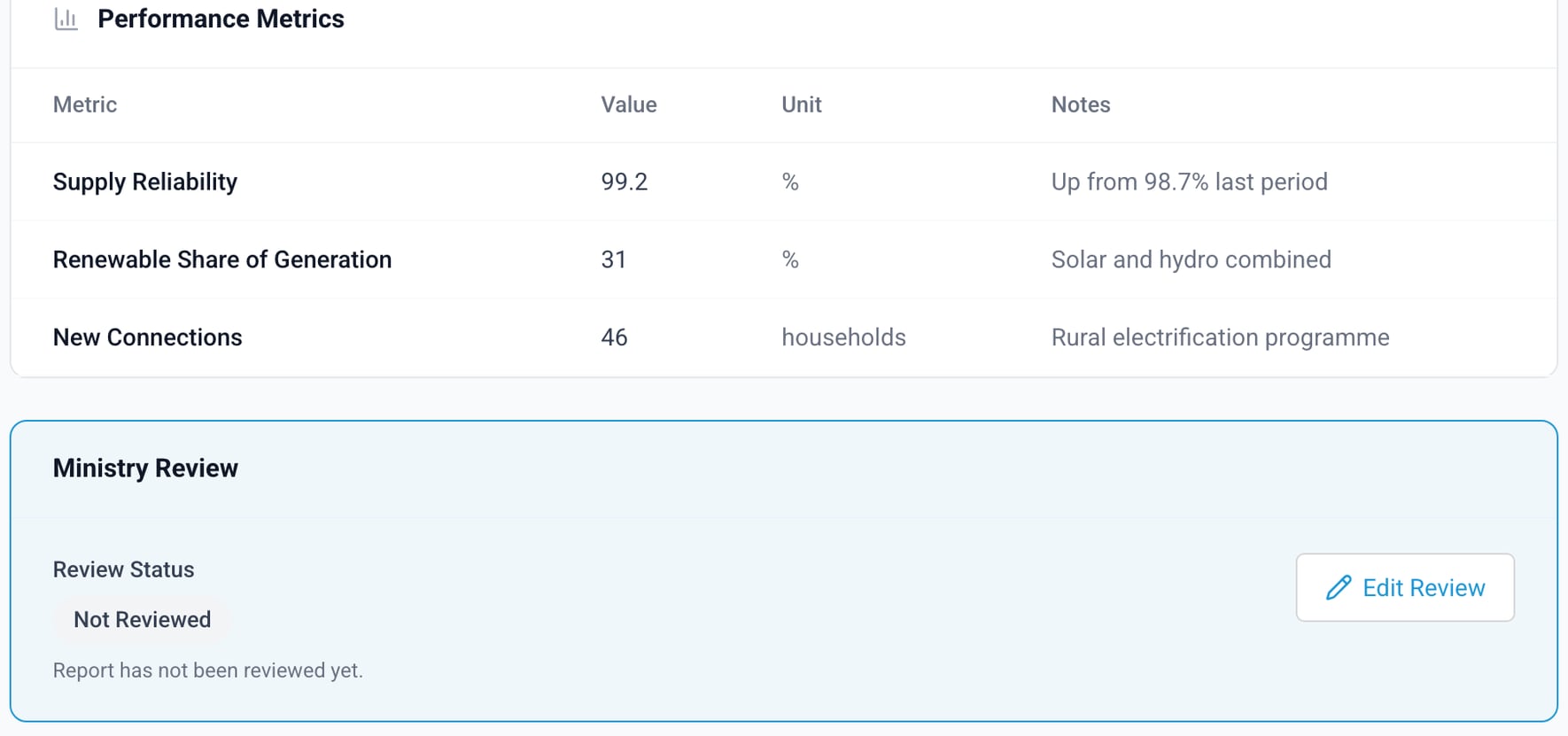
Metrics and the Ministry review
Each report carries metrics with a value, unit and note. Below them the reviewer records a review status and comments.
Sample data; figures are illustrative.
False Cognitive Technologies · Cabinet Link · October 2026
7
The Ministry reviewer works from one queue
01
Open the review dashboard
Counts for the period, the queue of reports waiting for review, and each SOE's status, including those that have not started.
02
Set a review status
Pending, no action needed, action required, or for the Minister's attention. The reviewer can also add comments.
03
Flag entries for the Minister
The reviewer flags single entries and chooses who sees them: the Minister, the MPE Chief Executive or all senior offices.
04
Return a report or ask a question
A report can go back to the SOE for revision, and the SOE team is emailed. The Minister or a reviewer can send questions to SOEs.
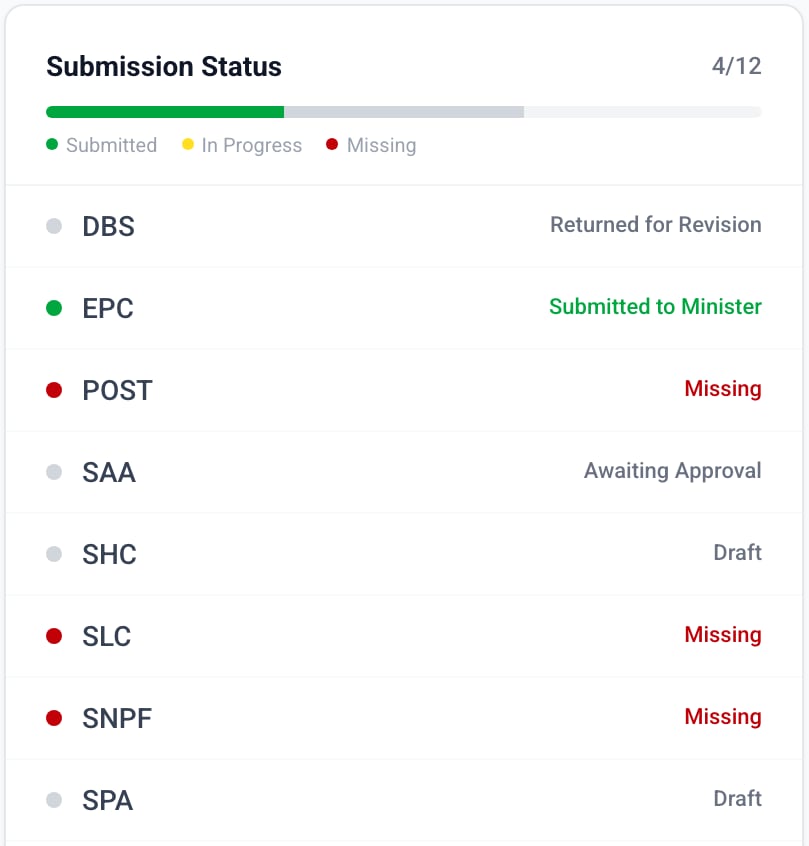
Submission status panel
4 of 12 submitted; the rest are returned, awaiting approval, in draft or not started (Missing). 8 SOEs shown. Sample data; figures are illustrative.
False Cognitive Technologies · Cabinet Link · October 2026
8
The Minister reads one briefing built from every report
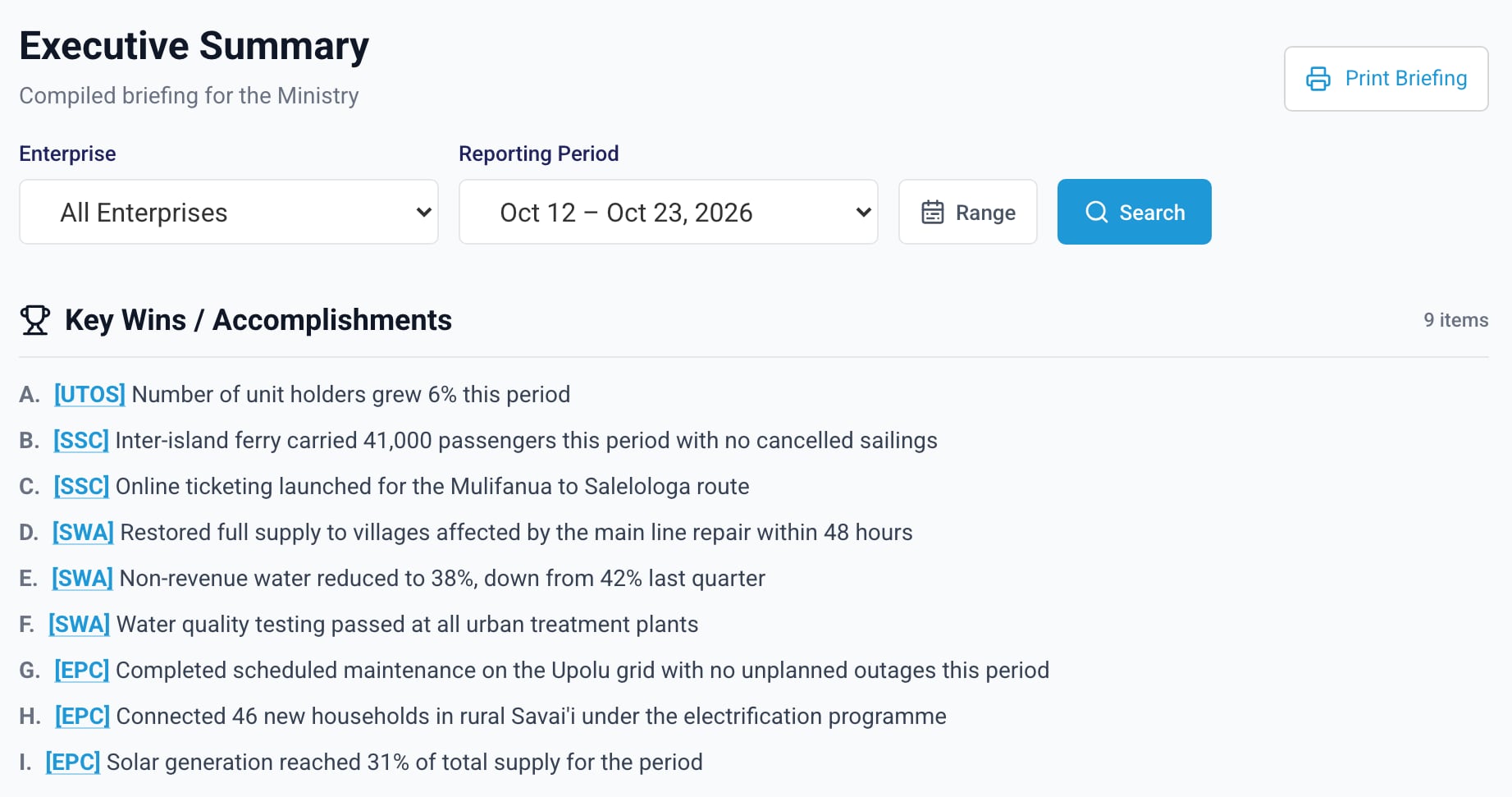
Executive summary
Every submitted report merged by section, each entry tagged with its SOE code. Sample data; figures are illustrative.
Decisions first
The Minister's dashboard opens with the items SOEs raised for decision.

The period at a glance
Counts of reports submitted, items for decision and active concerns sit above the decisions.

One SOE or a range of periods
The summary filters by SOE and by one period or a range of periods.

Printed for meetings
A print button gives a paper copy of the briefing.

Directory and archive
A contact directory and an archive of past reports sit on the same menu.
False Cognitive Technologies · Cabinet Link · October 2026
9
The Ministry can see which SOEs report on time
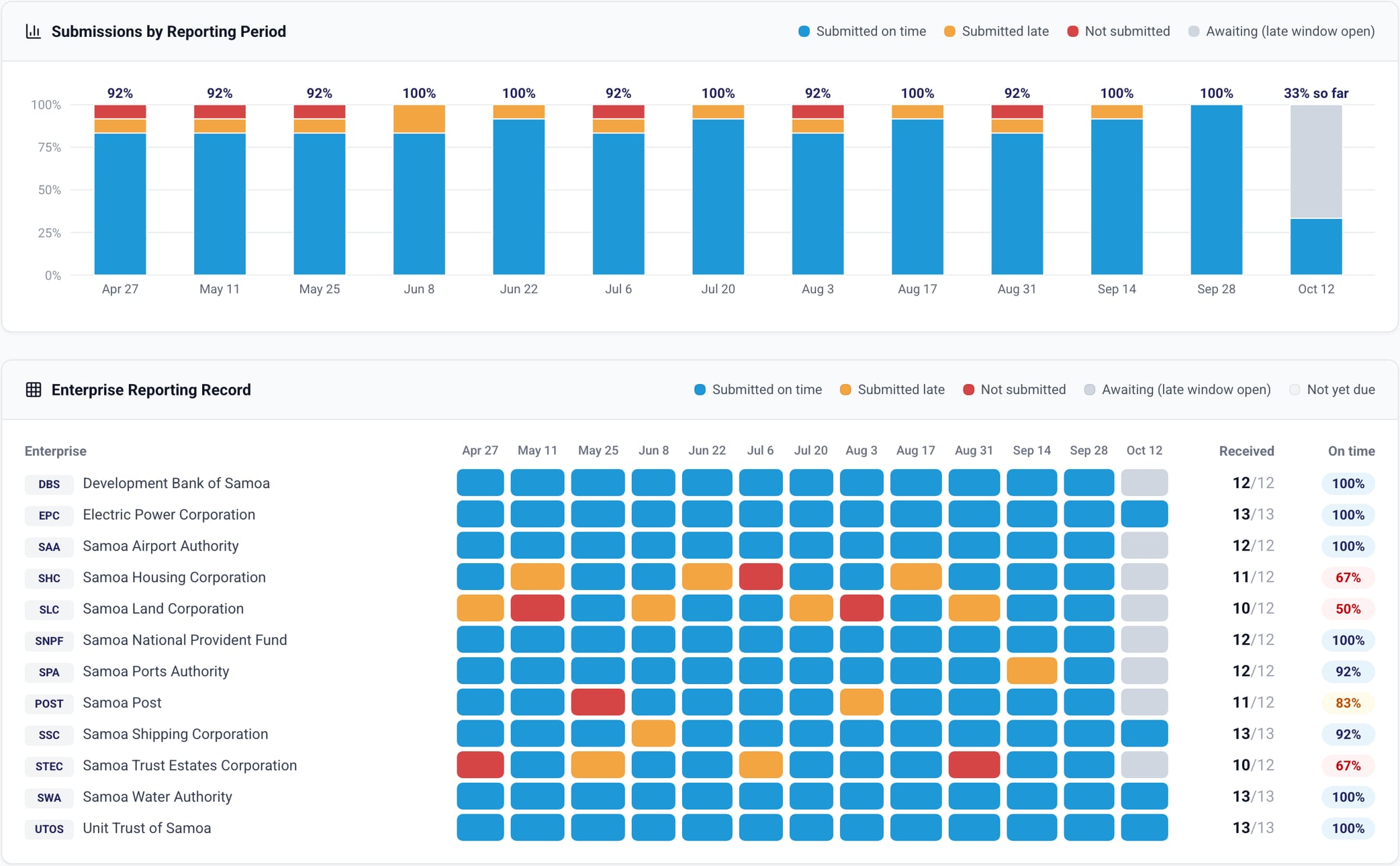
Performance Trends, submission compliance
Reports by period, then each SOE's record: blue on time, orange late, red missed, grey window open. Sample data; figures are illustrative.
Measured from the send time
On time means the CEO sent the report by Friday 5 pm. Nobody keys in a score.

Returned reports count again
A report the Ministry returns counts from when it is re-sent, so it can become late. We agree this rule at setup.

The last 13 periods, plus a monthly view
The monthly view gives each SOE's submission rate for the month: reports sent out of reports due.

Ministry roles only
Senior Ministry roles and administrators can open this page; the Executive Assistant cannot. SOEs do not see it.
False Cognitive Technologies · Cabinet Link · October 2026
10
SOE metrics become trend lines without extra data entry
01
SOEs report the same metrics each period
A trend lines up only when the metric name is the same every period, so we agree the names with each SOE at setup.
02
Two metrics are charted per SOE
The first two numeric metrics an SOE reports in two or more periods. The first is its headline indicator.
03
A fixed word list sets the direction
Names containing arrears, backlog, outage, wait, dwell, non-revenue or complaints received count a fall as better. All others count a rise as better.
04
Gaps stay visible
A dashed line marks a period with no value for that metric.
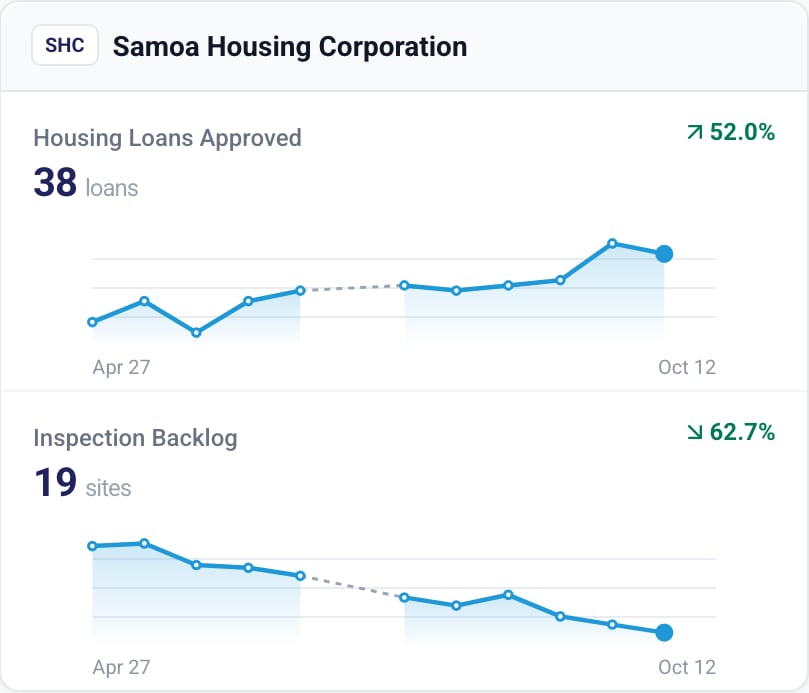
One SOE's two trend lines
The backlog falls, so its change shows green. Dashed segments mark periods with no value. Sample data; figures are illustrative.
False Cognitive Technologies · Cabinet Link · October 2026
11
What the Ministry can measure, and from when
Every measure comes from what SOEs already submit. Targets and the baseline are agreed with the Ministry, not set by us.
Who has reported
On the review dashboard and the Minister's dashboard, from period 1.
On-time, late and missed
Per SOE, in Performance Trends and the monthly view. Starts when period 1's late window closes, on the Monday of week 3.
Decisions, wins and concerns
On the Minister's dashboard and in the printable executive summary, from period 1.
Trends in SOE metrics
In Performance Trends once a metric has two periods of values; useful from about month 2.

Success measures to agree
We propose agreeing success measures in week 1, such as the share of SOEs reporting on time.

Baseline we ask for
We ask the Ministry for today's figures: how many SOE reports arrive on time and how long the briefing takes.
False Cognitive Technologies · Cabinet Link · October 2026
12
New reports start as Ministry only, and changes are logged
What the software does today, where the data goes, and what happens to it at the end.

Who can read a report
New reports start as Ministry only: the Minister, reviewers and admins. Summary pages do not apply this yet; see next slide.

Sign-in and sessions
Passwords of 8+ characters with mixed case and a digit, optional email code, idle sign-out, 5 attempts per 20 minutes.

Audit trail
Report creation, status and visibility changes, deletions and comments are logged with the user and time.

Where the data sits
Not yet set up for Samoa; the Ministry chooses the location. Today: one server, nightly backups, not yet encrypted.

Outside services
Email and its comment text go via ZeptoMail, backups to BunnyCDN, maps to Google. We can switch providers.

Your data at exit
A standard PostgreSQL database. We propose giving the Ministry a full copy at exit and deleting ours.